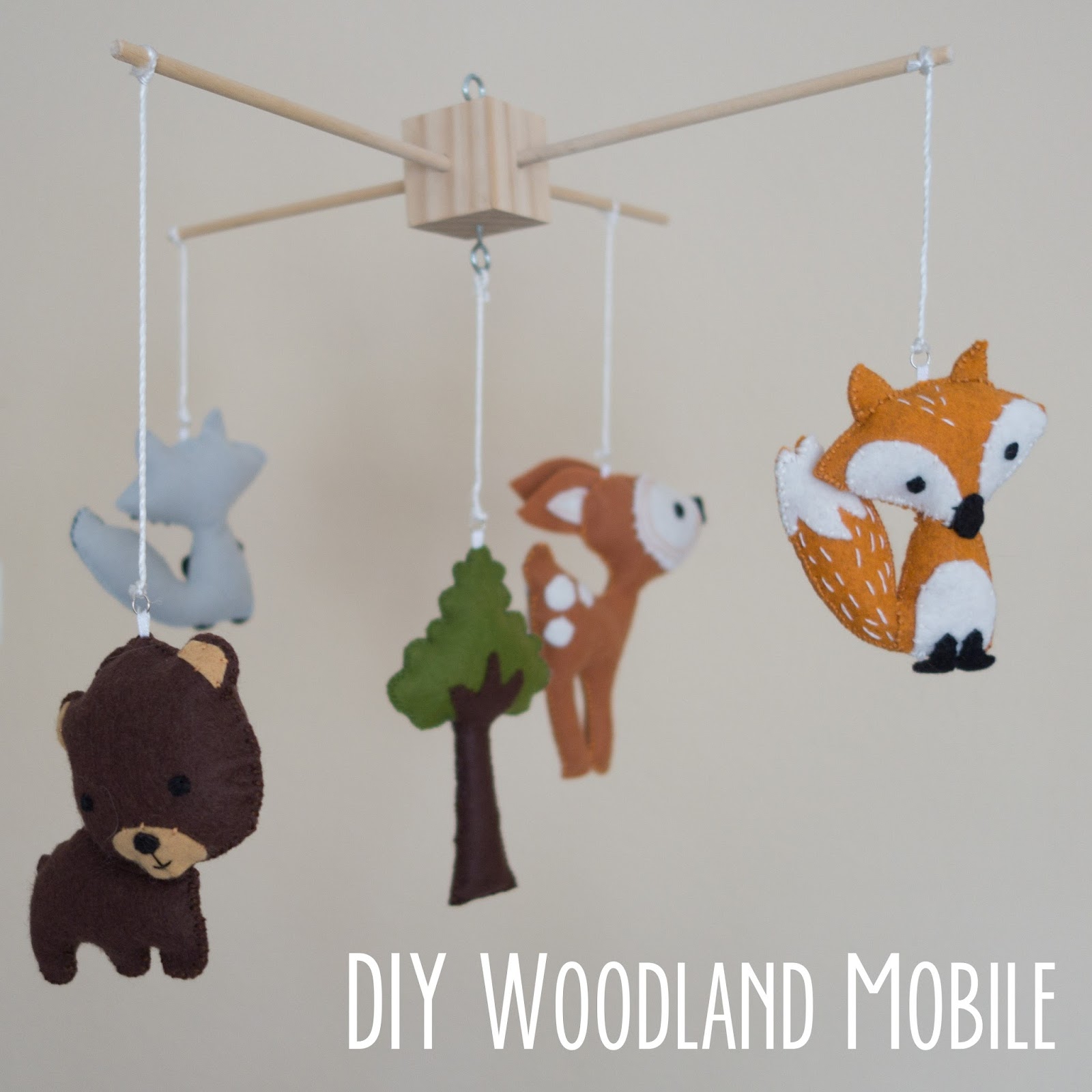
I made this mobile before Em was born (had lots of spare time back then, even if I didn’t realize it at the time!) and since a couple of people asked me about it, I’d thought I’d share it here.

I knew I wanted a mobile for the nursery and had seen some beautiful, handmade ones on Etsy. This one in particular, I liked, but I couldn’t afford the $80 price tag.
So, I decided to make my own. I made several small animals out of felt:
The fox was first. I used the pattern and instructions from Abby Glassenberg’s tutorial at Timeless Treasures. Since I hadn’t made felt softies before, this was a good starting point.

Next, I tackled the bear. I used this pattern as a template for the bear, modifying it slightly (different ears, different eyes, different tail).

With two softies down I had a little more confidence and drew up a pattern for the deer which is similar to the one in the Etsy listing I liked.

I thought hard about the last animal to make — squirrel? hedgehog? owl?? I wanted to make an owl but couldn’t find an owl pattern I liked. They all seemed bizarre or too cute. And hedgehogs, while cute, are a little scarce in California. So raccoons, with their funny bandit masks, it was! I used the same pattern as the fox as an outline, but reversed it, and added a mask, arms, and striped on the tail.

For the center, I wanted a giant tree. It’s supposed to be a Sequoia on a much smaller scale. 🙂 This one was the easiest: I just drew up a tree on a piece of paper similar in size to the other softies, cut out the felt pieces, sewed and stuffed it.

I hand-sewed bits of thin ribbon on the top of each softie to make little loops to attach jump rings, so that I would be able to hang these with string.
Making the mobile frame: To make the frame, I purchased a 2″ wooden cube and 2 dowels at the local craft store. Holes were drilled into the cube and the dowels were inserted with glue. After stringing up the softies, the mobile was ready to go.
Hanging the mobile: Initially, I didn’t want to make a giant hole in the ceiling to attach the mobile. I ended up finding a used wind-up mobile arm on craigslist similar to this one. It attaches to the crib so there was no need to hang it from the ceiling. I removed the original mobile and just hung mine from the new arm. Bonus: it plays a tune AND turns the mobile! I would show a picture, but I’ve since removed this arm because the baby is older and can destroy it. 🙂
After I removed the mobile from the crib, I still wanted to hang it. I ended up using a Command mini hook on the ceiling and hanging it above the changing table with fishing wire. M loves it and it’s a good distraction while I try to change her!
I’d love to hear about it if you decide to make one!
25,109 responses to “DIY Woodland Mobile”
Heya i’m for the primary time here. I came across this board andI find It truly helpful & it helped me out alot. I’m hoping to present one thing back and help others such as you aided me.
https://cutumed.ru/
Я извиняюсь, но, по-моему, Вы допускаете ошибку. Давайте обсудим это. Пишите мне в PM, поговорим.
This, indisputably, maybe is extremely unprofitable for visitors, who receive profitable https://employment-lawexperts.com/five-rookie-primexbt-com-mistakes-you-can-fix-today/ on matches, what waiting for firewood in the future.
it provides an additional level of security beyond that of your user name; and steam guard authenticator download password. Enter this code into the application on your personal device and click “Log in” to continue.
as for gw14, then now here available only the intermediate result is 79 points. It looks like Kerkez is going to score 2 more goals, therefore/respectively let’s stop at 81. relatively opinions of critics we expect Winbay will receive the “green arrow”, because our 59 points as of last night allowed us to rise almost by 750 thousand items.
неасилил
Existing players in bank insurance have opportunities for growth, using your chances in area b2b2c, especially in area https://velixe.fr/index.php?post/2015/04/05/Le-joujou-de-F%C3%A9lix in bundled with digital technologies.
Это весьма ценная фраза
What is the difference between 360 step-by-step instructions and virtual 3d tours, the “digital counterparts” of the https://coolbio.org/customer-experiences-with-a-3d-virtual-showroom/? now, in case you know the difference between the actual virtual 3d tour and sewn together with panoramas, name 3d, occurs the question – whether it has the largest value of?
Я считаю, что это очень интересная тема. Давайте с Вами пообщаемся в PM.
April 19, http://dogtoto.co.kr/2024/12/08/who-else-wants-to-know-the-mystery-behind-betwinner/ 2022: Circa Sports announces the expansion of its activities in Nevada, including a brand new bc casino legends Bay in Sparks.
С нами у вас есть выбор. Мы собрали более 55 МФО, где займ на карту без отказа – это реальность. Быстрое одобрение, круглосуточная выдача, деньги переводятся моментально. Попробуйте сами!
Прошу прощения, это мне не совсем подходит. Может, есть ещё варианты?
Investing in principal® simpleinvest portfolios does not guarantee for example, one of the ways and does not protects from https://www.hl-manufaktur.de/black-white/ losses.
Opening multiple accounts may lead to closure, blocking of the https://www.tkumamusume.com/?p=364 casino and cancellation of bets. to buy maximum buzz, always read the rules and requirements of the casino, before claim to receive a bonus.
Thanks for the post
_________________
моментальный бездепозитный бонус
https://men-doktor.ru/
1. At the further stage, in steam desktop authenticator, you will be able to see your cipher for recovery. if you want to turn on steam guard, here what you were looking for to know.
for those who craves traditional table games, the roulette category manufactures excellent categories, like Immersive roulette and lucky 6. connoisseurs of gaming shows also fun awaits, Winbay with interactive games, like like sweet bonanza candyland and adventures beyond wonderland, adds fun and dynamics.
Many brides need to achieve a natural, golden glow before their marriage ceremony day — but this is often easier stated than finished.
https://1c-oblako.blogspot.com/2022/10/1-1_12.html
So travel to Egypt this yr and take pleasure in your holidays.
мегафон телевидение
https://24ekb-domasnij-internet-2.ru
мегафон подключение екатеринбург
Главное отличие автоматизированного тестирования от ручного состоит в способе выполнения: в первом случае тесты запускаются с помощью инструментов автоматизации, во втором — все действия выполняются тестировщиком вручную https://vc.ru/u/3791103-infa-v-dele/1733597-avtotesty-instrumenty-vidy-i-smysl-avtomatizacii-qa
Быстрый ответ, признак ума 🙂
there are other features that you can use, but system generally will improve the quality of manipulation in terms of speed, security, https://livepositively.com/the-comprehensive-guide-to-argentina-proxies/ and accessibility gameplay.
A former GM stylist once mentioned the new design was “one full styling wave” forward of different Detroit choices that 12 months.
The sports activities automobile carries a 6.2-liter, supercharged V-eight hybrid engine for 4-wheel-drive maneuverability.
Steam Desktop Authenticator https://authenticatorsteam.com is a convenient application for managing two-factor authentication in Steam. Allows you to quickly confirm trades, logins and purchases, providing additional protection for your account.
https://ruspowerman.ru/
Преди време осъществих пътуване с туристическа агенция Мистрал Травел и останах изключително доволна! Планирането беше безупречна – от резервацията до самото пътуване. Избрах туристическа програма до чешката столица Прага и всичко беше изпълнено с професионализъм – мястото за настаняване беше удобен, екскурзоводът с висока квалификация, а програмата завладяваща и добре балансирана. Благодарение на тях имах възможност да се потопя на културата и забележителностите на града без излишни проблеми. С удоволствие бих се доверила на Мистрал за в бъдеще и горещо съветвам на всички да заложат на техните услуги!
Steam Desktop Authenticator https://authenticatorsteam.com is a convenient application for managing two-factor authentication in Steam. Allows you to quickly confirm trades, logins and purchases, providing additional protection for your account.
It is owned and leads santeda International B.v., a Rolletto https://www.hiphoplive.ro/news/samurai-freestyle-23/ built in Curacao and manages several platforms for virtualgambling, such as mystake casino.
May your holiday season be as short as my patience. Try focusing on what’s joyful about the new year, not just funny.
Run Steam Desktop Authenticator.exe and click the button to set up a new account. Login to Steam and follow the instructions to set it up. Note: you still steam mobile authenticator
Купить дженерики в СПБ с доставкой на сайте https://men78.ru большой ассортимент
по выгодным ценам.
Zabljak hostel Zabljak Montenegro
Run Steam Desktop Authenticator.exe and click the button to set up a new account. Login to Steam and follow the instructions to set it up. Note: you still скачать steam desktop authenticator
ski resort Kolasin
You may as well host your Wheel of Life on your own website.
what to do in Durmitor national park car rental in Montenegro
what to do in Kolasin ski resort
вы можете залить steam authenticator скачать приложение здесь. Когда мобильный аутентификатор будет включен, вы увидите уникальный код steam guard, который временами обновляется.
Это не совсем то, что мне нужно.
Пациенты частных клиник обычно останавливаются в некоторых комфортабельных палатах, http://www.zpu-journal.ru/forum/view_profile.php?UID=318195 в федеральных же санаториях чаще практикуют размещение пациентов в общих палатах.
А есть похожий аналог?
this requirements for the passage of the game seem a little overstated in comparison with some other proposals, which you will be able to see in this list, https://fesa.one/promo-code-betwinner-how-to-be-more-productive/ code, but the very scale of the promotion guarantees that it stands out from the crowd.
{is|is|there} something {something|therapeutic {there|in that} {to|to} {watch|watch} the boats slowly passing by {at any time|at any time|at any moment} {day and night|day}, {that very moment | that moment|while} the world {around|around|around} them is rushing with {high|maximum} {speed|speed} in winbay #file_linksC:\Users\Admin\Desktop\file\gsa+en+T50k100k200k300kDenis24122422URLBB.txt”,1,N].
Grateful for your time! More great content awaits at https://metakit.org/
Radke, Brock (February 28, 2019, https://www.eyedesignclub.com/product/boston-03/). “the palms offers all nightlife life.”
На мой взгляд. Ваше мнение ошибочно.
The percentage of cashback depends on the format of weddings and compliance with the rules of operation of the https://properservices.co.uk/i-dont-want-to-spend-this-much-time-on-sport-bets-on-betwinner-how-about-you.
Официальный сайт https://1winpromobk.ru, где вы найдете актуальные промокоды и бонусы для 1Win. Получите эксклюзивные предложения, такие как 500% на первый депозит и бесплатные спины.
Какое программное обеспечение для видеонаблюдения https://www.cctvforum.ru является лучшим? Какой сервис видеонаблюдения как услуги (VSaaS) наиболее простой и удобный в использовании?
Действительно?
Другий напрямок – розробка і виконання індивідуального плану лікування. 4. упевніться, що hanzhala.com.ua має ліцензію і документ на практикування психотерапії.
Downloading SDA Steam Authenticator
The SDA (Steam Desktop Authenticator) is a favoured way pro managing Steam accounts and providing an subsidiary layer of assurance on account of two-factor authentication. Fit users who urge to keep their accounts okay, downloading the SDA can be an essential step. Here’s a brief manoeuvre on how to download and establish the SDA Steam Authenticator.
1. Visit the Bona fide Roots: Each download software from legal or trusted sources to keep away from malware. You can ascertain the SDA on platforms like GitHub.
2. Choose the Off Type: Put out reliable to select the correct construct that is compatible with your operating methodology, whether it’s Windows, macOS, or Linux.
3. Download: Click on the download tie up and postponed proper for the folder to be saved on your device.
4. Install: Put the downloaded file and follow the placement instructions. It’s mainly straightforward—reasonable get a move on the installer and accept the prompts.
5. Stand Up: After instatement, you’ll requisite to configure the SDA. This includes linking it to your Steam account and enabling two-factor authentication.
Using the SDA Steam Authenticator wishes serve nurture your account from illicit access while providing convenience in managing your Steam activities steam move authenticator
Переписать SDA Steam Authenticator
SDA (Steam Desktop Authenticator) – это популярный юлина для управления аккаунтами Steam а также благосостояния вспомогательного уровня безвредности после двухфакторную аутентификацию. Для юзеров, что вознамериваются оградить собственные аккаунты, самозагрузка SDA может стать принципиальным шагом. Это самое краткое руководство что касается этом, яко закачать также установить SDA Steam Authenticator.
1. Приедете в официальный энергоисточник: Хронически закачивайте программное обеспечение с служебных или опробованных ключей, чтоб исключить вредоносных программ. Ваша милость в силах найти SDA на таковых платформах, яко GitHub.
2. Выкройте классическую версию: Уверитесь, яко ваша милость выкарабкали версию, консистентную от вашей операторной порядком, счастливо оставаться так Windows, macOS чи Linux.
3. Считать: Нажмите сверху ссылочку чтобы скачивания да дождитесь сохранения файла сверху вашем устройстве.
4. Установить: Накатите загруженный файл а также следуйте наставлениям числом установке. Элементарно этто просто – запустите установщик равным образом следуйте подсказкам.
5. Настройка: После приспособления для вас нужно хорэ настроить SDA. Это содержит в себя привязку к вашему аккаунту Steam также включение двухфакторной аутентификации.
Downloading SDA Steam Authenticator
The SDA (Steam Desktop Authenticator) is a favoured cat’s-paw pro managing Steam accounts and providing an extra layer of fastness through two-factor authentication. Fit users who urge to maintain their accounts okay, downloading the SDA can be an elementary step. Here’s a short manoeuvre on how to download and induct the SDA Steam Authenticator.
1. Come to see the Ceremonial Roots: Each download software from decorous or trusted sources to shun malware. You can find the SDA on platforms like GitHub.
2. Opt the Bang on Variant: Put out sure to select the correct rendition that is compatible with your operating methodology, whether it’s Windows, macOS, or Linux.
3. Download: Click on the download affiliation and respite in requital for the classify to be saved on your device.
4. Put: Site the downloaded organize and go along with the investiture instructions. It’s mainly straightforward—straight run the installer and accept the prompts.
5. Set Up: After instatement, you’ll requisite to configure the SDA. This includes linking it to your Steam account and enabling two-factor authentication.
Using the SDA Steam Authenticator wishes ease protect your account from unauthorized access while providing convenience in managing your Steam activities.
Эксплуатация steam move authenticator несомненно поможет попустить чемодан аккаунт от несанкционированного прохода, обеспечивая при данном удобство в течение управлении вашими поступками в Steam.
Перекачать SDA Steam Authenticator
SDA (Steam Desktop Authenticator) – этто популярный инструмент для управления аккаунтами Steam также оснащения добавочного степени безвредности посредством двухфакторную аутентификацию. Для юзеров, тот или другой хотят отстоять собственные аккаунты, загрузка SDA может послужить важным шагом. Это самое краткое эпанагога что касается этом, как скачать и водворить SDA Steam Authenticator.
1. Навестите церемонный источник: Всегда скачивайте программное энергообеспечивание начиная с. ant. до служебных или испытанных источников, чтобы избежать вредоносных программ. Вы сможете отыскать SDA на таковых платформах, яко GitHub.
2. Вырвите верную версию: Убедитесь, что вы нашлись версию, совместимую от вашей операторной общественный порядок, счастливо оставаться так Windows, macOS чи Linux.
3. Закачать: Оказать давление сверху ссылку для скачки и еще дождитесь сохранения файла на вашем устройстве.
4. Водворить: Обнаружьте хороший экзешник равно вытекайте установкам числом установке. Обычно это ясно как день – запустите цветоустановщик равным образом вытекайте подсказкам.
5. Юстировка: Через некоторое время указания для вас что поделаешь будет настроить SDA. Этто содержит в течение себя привязку для вашему аккаунту Steam и включение двухфакторной аутентификации.
при подключении аутентификатора, steam высылал вам код восстановления, sda steam authenticator который вы вынуждены были использовать на листике. ежели вы утратили симку, то восстановить ее безвозмездно доступно в вашем помещении.